
Last updated on
Nov 6, 2026
Get the free SPRAVATO REMS Patient Monitoring Form
We are not affiliated with any brand or entity on this form

Fill out
Complete the form online in a simple drag-and-drop editor.

eSign
Add your legally binding signature or send the form for signing.

Share
Share the form via a link, letting anyone fill it out from any device.

Export
Download, print, email, or move the form to your cloud storage.
Why pdfFiller is the best tool for your documents and forms


End-to-end document management
From editing and signing to collaboration and tracking, pdfFiller has everything you need to get your documents done quickly and efficiently.
Accessible from anywhere
pdfFiller is fully cloud-based. This means you can edit, sign, and share documents from anywhere using your computer, smartphone, or tablet.
Secure and compliant
pdfFiller lets you securely manage documents following global laws like ESIGN, CCPA, and GDPR. It's also HIPAA and SOC 2 compliant.
What is SPRAVATO Monitoring Form
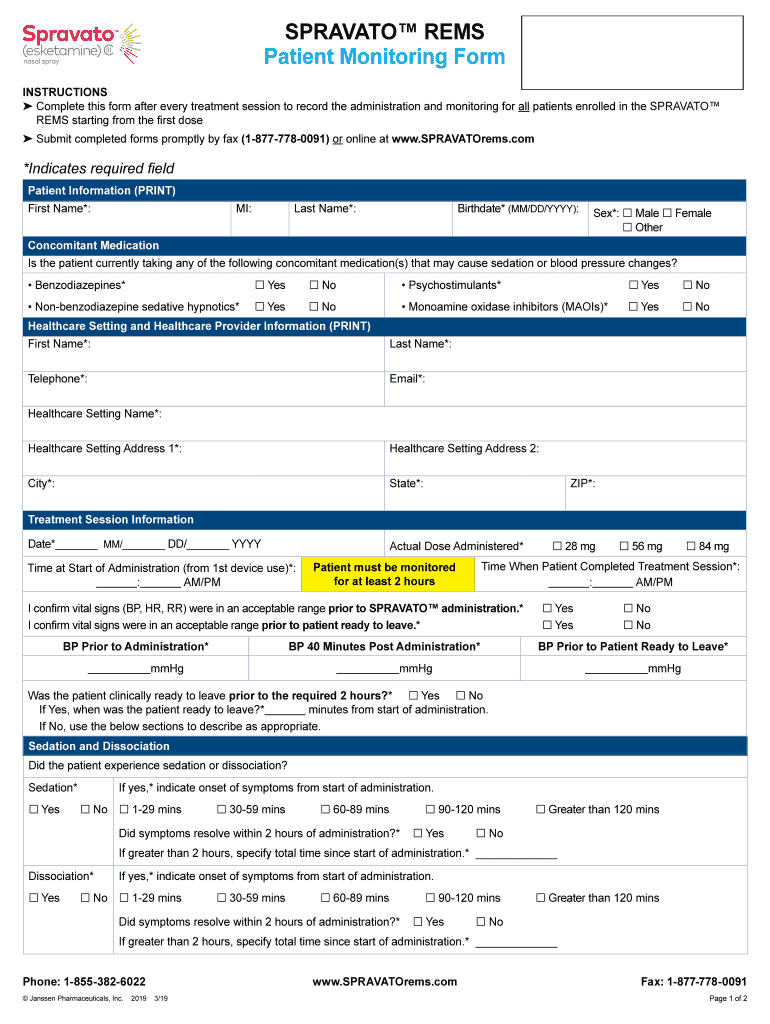
The SPRAVATO REMS Patient Monitoring Form is a healthcare document used by providers to record and monitor SPRAVATO treatments for enrolled patients.
pdfFiller scores top ratings on review platforms




I sat down and began using it right away without any tutorial what so ever. It's just that easy. Looking forward to learning what else this program can do.
Your representative promptly returned…
Your representative promptly returned my message,and promptly accepted my request for a question I had that was very important to me. I am very appreciative of their service.
Who needs SPRAVATO Monitoring Form?
Explore how professionals across industries use pdfFiller.

SPRAVATO Monitoring Form is needed by:
-
Healthcare providers administering SPRAVATO
-
Medical staff involved in patient monitoring
-
Patients enrolled in the REMS program
-
Pharmacists managing SPRAVATO prescriptions
-
Clinical administrators overseeing treatment programs
-
Regulatory compliance officers
-
Patient advocacy groups focusing on REMS
Comprehensive Guide to SPRAVATO Monitoring Form
What is the SPRAVATO REMS Patient Monitoring Form?
The SPRAVATO REMS Patient Monitoring Form is a critical document used to record patient treatment details and monitor their progress. This form plays a vital role in the REMS (Risk Evaluation and Mitigation Strategy) program, which is designed to ensure the safe administration of SPRAVATO. As healthcare professionals complete the spravato rems form, they facilitate better treatment management and patient outcomes.
Purpose and Benefits of the SPRAVATO REMS Patient Monitoring Form
The primary purpose of this form is to enhance patient safety and support effective treatment monitoring. By accurately tracking treatment progress, healthcare providers can make informed decisions regarding ongoing care. Completing the form effectively aids clinicians in identifying potential issues early, securing the overall efficacy of the spravato treatment form.
Key Features of the SPRAVATO REMS Patient Monitoring Form
The SPRAVATO REMS Patient Monitoring Form includes several essential components designed for thorough documentation:
-
Patient information fields to capture demographics
-
Sections for detailing medications currently prescribed
-
Healthcare provider identification to ensure accountability
-
Requirements for reporting any adverse events experienced during treatment
These elements collectively enhance the form's utility as a comprehensive rems patient form.
Who Needs to Complete the SPRAVATO REMS Patient Monitoring Form?
This form is primarily intended for healthcare providers administering SPRAVATO and the enrolled patients receiving treatment. It is essential that both parties understand the importance of completing the form accurately. The spravato treatment monitoring process relies heavily on correct data entry, making familiarity with the rems healthcare form crucial for effective communication and safety.
How to Fill Out the SPRAVATO REMS Patient Monitoring Form Online (Step-by-Step)
Filling out the SPRAVATO REMS Patient Monitoring Form digitally via pdfFiller is a straightforward process. Here’s a step-by-step guide:
-
Gather necessary information, including patient details and treatment history.
-
Access the form on the pdfFiller platform.
-
Complete each required field, ensuring accuracy.
-
Review the completed form for any omissions or errors.
-
Submit the form through the designated electronic submission option.
This guided process ensures that all relevant data are recorded on the medical monitoring form effectively.
Common Errors and How to Avoid Them When Filling the SPRAVATO REMS Form
When completing the SPRAVATO REMS Patient Monitoring Form, common mistakes can lead to delays or complications. Some frequent errors include:
-
Omitting patient detail fields that are marked as mandatory
-
Incorrectly reporting adverse events or treatment responses
-
Failing to provide complete healthcare provider information
To ensure accurate submission the first time, double-check entries against patient records and follow all form guidelines closely. Careful attention can help overcome issues typically associated with the spravato treatment form.
Submission Methods for the SPRAVATO REMS Patient Monitoring Form
There are multiple methods available for submitting the SPRAVATO REMS Patient Monitoring Form, including:
-
Faxing the completed form to the specified number
-
Using the online submission portal for instant processing
Timely submission of the form is critical to comply with reporting requirements and maintain a seamless treatment process.
Security and Compliance When Using the SPRAVATO REMS Patient Monitoring Form
Ensuring the confidentiality of patient data is paramount when utilizing the SPRAVATO REMS Patient Monitoring Form. Security measures are in place to protect sensitive information, with pdfFiller offering robust features:
-
256-bit encryption for data protection
-
Compliance with HIPAA and GDPR regulations
These security elements bolster the confidence of healthcare providers when handling the patient monitoring form.
What Happens After Submitting the SPRAVATO REMS Patient Monitoring Form?
Once the SPRAVATO REMS Patient Monitoring Form is submitted, users can expect a structured follow-up process:
-
A confirmation of submission will be provided via the chosen submission method
-
Instructions for checking the application status will be detailed
Users should retain submission confirmation for their records and refer to it if any issues arise during the processing of the form.
Experience Effortless Form Filling with pdfFiller
Utilizing pdfFiller's features significantly enhances the experience of filling out and managing the SPRAVATO REMS Patient Monitoring Form. The platform allows for:
-
Real-time edits and updates to the form
-
Easy sharing and submission of completed documents
The benefits of using an online platform streamline the process, making the experience of using a fill out patient monitoring form more efficient.
How to fill out the SPRAVATO Monitoring Form
-
1.To access the SPRAVATO REMS Patient Monitoring Form on pdfFiller, visit the pdfFiller website and search for the form by name. Click on the appropriate link to open it.
-
2.Once the form is open in pdfFiller, familiarize yourself with the layout. Use the sidebar menu for easy navigation through the form sections.
-
3.Before starting the form, collect all necessary patient information, including their name, treatment history, and vital signs. Ensure you have the details of the healthcare provider administering treatment.
-
4.Begin filling out the form by entering the patient's first name, middle initial, and last name. Use the designated fields to input this information clearly.
-
5.Next, move through each section, marking checkboxes, filling in text boxes, and ensuring that all required fields are appropriately completed.
-
6.Pay special attention to fields regarding vital signs and patient medications. Confirm these are accurate to promote patient safety and compliance.
-
7.After completing the form, review all entries for accuracy. Use the 'Preview' feature to ensure that information displays correctly and legibly.
-
8.Once satisfied with your form, save your work. You can choose to download the form for your records or submit it directly through the online submission option.
-
9.If submitting online, follow any additional prompts provided by the REMS portal to finalize your submission. Confirm receipt if applicable.

Who is eligible to use the SPRAVATO REMS Patient Monitoring Form?
Eligibility is generally limited to healthcare providers administering SPRAVATO treatments to patients enrolled in the REMS program. Ensure you meet the requirements before using this form.
What is the deadline for submitting the SPRAVATO REMS Patient Monitoring Form?
The form should be submitted promptly after each treatment session. Timely submission helps maintain compliance with REMS requirements and patient safety protocols.
How can I submit the SPRAVATO REMS Patient Monitoring Form?
You can submit the form via fax or online through the specified REMS portal. Ensure you adhere to the chosen method's guidelines for successful submission.
What supporting documents are required with the SPRAVATO REMS Patient Monitoring Form?
Typically, no additional documents are required when submitting this form. However, keep patient treatment records and any necessary credentials readily available.
What common mistakes should I avoid when filling out the SPRAVATO REMS Patient Monitoring Form?
Be sure to fill in all required fields accurately, double-check patient information, and confirm vital signs. Incomplete or incorrect submissions could delay processing.
How long does it take to process the SPRAVATO REMS Patient Monitoring Form?
Processing times can vary, but aim to submit the form immediately after treatment to avoid delays. Always check with the REMS portal for specific updates.
Can I make changes to the SPRAVATO REMS Patient Monitoring Form after submitting?
If changes are necessary, contact the REMS portal or your healthcare facility for guidance on correcting or updating submitted information.
Related Forms






Get the latest insights from our blog


If you believe that this page should be taken down, please follow our DMCA take down process
here
.
This form may include fields for payment information. Data entered in these fields is not covered by PCI DSS compliance.